GratSpot: Free Internet,computer,web development and blogging Tips and Tricks: Internet
Showing posts with label Internet. Show all posts

Saturday, 19 March 2016

Get Free Youtube Subscribers+Likes+Comments+Views

Get Free Youtube Likes+Subscribers+Views+Comments:

While making a youtube account for the first time we face a huge hardship in gaining likes, subscribers,comments or even views on our uploaded videos. At that time the though that establish in our mind is to quit uploading videos to youtube. But it's not the right way because you are not alone in this world. People are waiting for your arrival to help you. You just have to avail that opportunities. With my these trips you will get free youtube subscribers likes comments and views and when next time you will upload video you will feel something new where people will like your videos much better before and I think that's the point you are waiting for so let's take some easy steps and be gone viral on youtube.
Today I am sharing some easy and reliable tips with you so that you can grow your channel and create a huge audience.
free youtube subscribers logo

Here I will share some sites that you can use on daily basis and Get free Youtube subscribers+Likes+Views+Comment.

(1) YTMONSTER;

 This is the most trusted,reliable and fast service present on internet. In this site you will have to earn points and then you will have to use these points to get free youtube subscribers likes comments and views. You can earn points on YTMONSTER by watching other people videos or by gaining referrals. The more referral you have the more you have chances to get more points. Once you earn points invest them to gain likes+subscribers+comments+views for your videos. The video that you want to show is the choice of yours. you can also select suitable time for your video that you want to show to others. Keep in mind that your 10 seconds video will cost you 1 point, 1 subscriber will 25 points, 1 comment will 50 points and one like will take your 25 points away.
Use this site more and more and then you will learn its terminologies. you can contact me anytime.

ytmonster logo

(2) Kingdom LIkes;

kingdomlikes logo

This is the perfect site for social media promotion not just youtube but all other popular social media sites like google+,twitter and instagram. This site carry a lot of option and that's the reason it has taken place in the list of top sites. In this site you can earn points by various ways as listed below;
  • Liking Google+ posts
  • Sharing Google+ posts
  • Adding members to your google+ circles
  • Twitter Followings
  • Twitter likes
  • Twitter retweeting
  • Facebook posts likes
  • Facebook Page likes
  • Facebook Posts share
  • Facebook Followers
  • Youtube Videos view
  • Youtube video like
  • Youtube channel subscribers
  • And lot more
Now you can invest your points to gain Youtube subscribers+followers+likes+views+comments and sharing.
The more points you earn the more you have chances to grow your youtube channels.

(3) Socialtrader.co;

Although seeing fake website form its stature this website does what you are searching for. This site can give you free youtube likes and video views. Here is no option for getting subscribers and comments. You can earn points by following way;
  • Watching videos
  • Liking videos
  • Completing offers
  • Referring members
  • If your members get premium account you get extra points
Now it's time to invest those points to earn some real youtube views and likes. Go to manage video views or manage video likes and there add your desired video. Once you add your video you will notice the big change in increasing your youtube likes and views. Try to get more and more referrals to get likes+views without watching other videos.
Your one video watch will cost you 1 point while 1 like will cost 10-20 points.

(4) Gainsubs;

This site gives you the easiest method to get subscribers and likes for your videos. After signing up to this site you will have to add your desired video and then you will have to earn subscribers and likes. search for the videos that is marked with like4like or sub4sub and click on it. once you click it you get it. You have no need to do something else. You can earn something more subscribers and likes by referring other members to this site through your link. The more referral you get the more your channel will go viral.

gainsubs main logo

You can also search for some other best sites like that but perhaps these are the best site to work with. I have used them all and found them very helping. It's on you how you see it but its a good way to start your early youtubing journey.

Note;

Use it on your own risk. I will not be responsible for any type of complication that arise.

Google Search Tags;

Get free youtube subscribers
Get free youtube Video likes
Get free youtube video views
Get free youtube followers
Get free youtube video subscribers and likes
Get youtube channel subscriber
Grow your youtube channel for free 


Posted By: Dr Rehman on Saturday, 19 March 2016

Thursday, 18 February 2016

Top 10 Best And Easiest Ways To Make Money Online


  As far as making money is considered, there are different people who earn money in different ways but today I will guide to make money online from your own home without hard working. There are different types of online works waiting for you to get money. I will guide you thoroughly for " How to make money from internet".
  Making money from Internet is not a hard job. You have to work for some hours on your computer and perform any task that you know really well. It could be the work of any type from writing to singing and from singing to dancing and from dancing to blogging. So it doesn't need a hard work you just have to be special in any field and then you will be eligible to make money from internet. So get ready to see the post " Top 10 Best and Easiest ways to make money online".

1) Blogging:


 Blogging is perhaps the best method to make a good money from your home. It don't needs too much experience. Just write on any of the topic of your choice and publish it to the internet. Your audience will see your posts and if they likes your posts they will come again and again for your blog and now they are not just your visitors but a valuable visitors now they are. because you can use them to make money online.There are several sites which offer you a chance to make a free blog but the most famous one is Google Blogger. If you want to know enough for google blogger then see this post .
Others blogging sites are given below;
 After you have created your blog with any of the above services it's time to think about the ways of making money from that blog. First make your blog popular by posting interesting things and once you get famous you think for other ways of making money.

a) Google Adsense:
   Once you set your blog and post enough contents on it you go for signing up to google adsense. Google adsense is an advertising service which after approving shows ads on your blog and when your visitor clicks on it you get money. It's the most simple,easiest and reliable way to make money online.

b) Other advertising services:
   If you are unable to get google adsense approved then don't worry there are several other great sites waiting for you. Just join any of the following ad service and show their ads on your site to make money.
Here is a list of some of the great advertising services that you can join and make money form.

==> Infolinks:
                       If you are unable to get adsense approval then go for infolinks. It's the best alternative of adsense and show ads on the text of your blog. When visitor will click that specific text you will get money. There are different types of ads that you can use here with infolinks. Infolinks approves little faster as compared to adsense. It also make a good money.

==> Media.net:
                         If your blog is receiving enough traffic from all over the world especially united states, then you can join this advertising service co founded by Yahoo and Bing. It's a reliable advertising service and also pays a good money. Their ads are of good quality and gets much attention.
==> Clicksor:
                      It's another alternative to adsense which shows attractive banner ads on your blog. It has also a referral system where you can make money by referring your friends to this advertising system. I have also used it and it offers good money. It could be the best alternative to google adsense. If you are not getting google adsense approval then give it a single touch.
        That was all about how to make money from blogging. Now we will move towards other ways of making money from internet.

2) Make Money From Youtube:


   If you are interested in videos and can make a good video then you are near to make money from youtube.
One can make a good money from youtube if he knows about video editing and capturing. It's not a hard job its very easy and even a child can perform this task. So why we not go for this easiest method which can give us a good money.
 If you are interested in making money from youtube then join Youtube.com and upload your favorite videos there. If your videos are likes by people then definitely you can get money. Just start uploading your own videos and then join youtube partner program. It will display ads on your videos and when someone will click these ads you will get money. Its a very simple method just try hard and you will be succeed soon. Upload your videos and then turn on monetization for it to generate money.

3) Freelancing:


    There are websites where people are searching for people that can do work for them. If you cna do their work then you will get money. Just search the website for any work that you have the ability to do and then take it. If he offered that work to you then you will get money after completing tasks. On these sites there are more than thousands of jobs waiting for you where you can generate money. Some great freelancing websites are following:
  • Freelancer.com
  • Guru.com
  • odesk.com
  • elance.com

4) Surveys:


    There are sites which give user the money when the take surveys. These websites use the information from the user to improve their products and that's why they are giving money to user for taking  surveys. Search the survey and offer information and then submit it to the website and they will give you money for them. It's a good way to make enough money. You can also refer you friends to make money with you. Upon each referral you will get enough money. Some survey taking website are listed here:

  • Surveyscout.com
  • Surveyhead.com
  • surveysavvy.com

5) Question Answer:

   There are sites around internet where people ask their question and when someone answer them correctly the site gives money to the user. So select any of your special field and see the questions of the people and then if you the answer post the answer there. I f you give correct answer you will definitely make money.
Some of the best such sites are listed below:
  • http://www.knowbrainers.com/
  • http://www.justanswer.com/

6) URL Shortner Service:


       If you want  to make money for just posting the link then you can try this method. This is a really simple method. Just short your long url with these site and then post there short links anywhere you want. When someone will click on such link they will see advertisement for five seconds and you will get money for that. If you own your own blog/site then you can make a huge amount of money just by shorting the links placed on your blog/site. If you are your blog owner then you can short all the links on your blog with a script they provide you on their site. They also show popupads if you like because this type of ad gives more money. You can also make money by referring other friends.
 Some of the best URL shortner services are shortlisted here:

7) Make Money with Fiverr:


  Fiverr is a website where you can sell your work for 5$. Just write any type of post and sell it for 5$. If someone will like your post they will but it from you. Search google for it to know the tricks of making money from Fiverr. You can access the site through this link https://www.fiverr.com/.

8) Affiliate Marketing:

If you can sell products on your website or social media sites then this trick is for you. Just join any of the affiliate sites and sell their products. You will get commission for every sale you make. So if you have the ability of affiliate marketing then this trick can make 1000$ for you in no time. Some of the best referral sites are listed below:
  • Clickbanks
  • Maxbounty
  • Amazon
  • Ebay
  • Linkshare

9) View Advertisements and complete offers:

If you want to make money for just viewing ads then you can do it. It's simple and reliable. You get money for every ads you view. Further you can make money for completing offers such as downloading apps, Watching videos,signing form or taking surveys. These sites also offer you a chance to get money from the referral you get. Some of the best sites are listed here:
  • Clixsense.com
  • Neobux.com
  • ojoo.com

10) Join Payoneer Referral Service:

 Payoneer is online banking service where you can pay or receive money form different sources. It offers us a chance to make money online. Join it referral service to earn 25$ per referral. When someone will join through your link and gets 100$ rupees in his payoneer account both of you will get 25$. So it's a great way to make money from. Just join through my referral link and we will both get 25$ in free. So it's the most easiest way. Share it with your friends. You can use social media service to gain referral.
Join my referral link here.              Payonner affiliate 
    
   That was all about how to make money from internet. If you have knowledge of any other methods then share with me in the comment section.

Share our Work:


Google Search Tags:

Best ways to make money online
How to make money form internet
Top 10 ways to make money online
Make money from Internet
Making money online tricks
Top 10 reliable ways to make money
Easiest ways to make money

Posted By: Dr Rehman on Thursday, 18 February 2016

Tuesday, 16 February 2016

Download Youtube Videos Without Software in any format

Download Youtube videos without software in any format:

  Youtube is a video sharing website which is used by millions of people everyday. While searching on youtube we come across such videos that are very interested and the first thinking that come in mind is that to download this video. There are too many softwares to download video from youtube but how would be the experience if we download video without using any software? Today I will guide you " How to download youtube videos without any software in any format".
  To download videos from youtube we will use a third party website to do our work . Its safe and easy and you will love this. Follow the following steps to download video from youtube in few minutes.
  • First of all go to youtube and search for the video that you wish to download.
  • Examine the link of the video and now we will have to make some changes in the link. Don't be afraid its easy and simple. Add SS before the youtube in the video link. For example if video link is as "https://www.youtube.com/watch?v=PtUCt12qeC4"  then after making changes the link would be like that  "https://www.ssyoutube.com/watch?v=PtUCt12qeC4" .You can also see the photo for illustration. 
  • Now press enter and you will be taken to a new webpage from where you can download the video just by clicking download. Is it simple? see the photo how it would look like.
  • As the screen appear just download the video in any format you wish to have. You can also save it as mp3 file if you desire.
If you are not happy with this step and it seems puzzling for you then don't care a new trick is waiting for you just get ready.

Download Youtube videos from Downvids.net:

  If you want to download videos directly from another website then this trick is for you. Just go to the link address  "http://downvids.net" or click the link given upward. After going to this site paste the URL of the youtube video that you want to download and click the download button. You will be given a direct link to your video. You can also save it in mp3 format. You can also download the whole youtube playlist from this site. Its a great,easy and fast loading site to work with. You can see the main page of this site in this screenshot.

Download video from Keepvid.com:

  You can also download youtube video from "keepvid.com" . Just visit this site and paste the url of the video you wish to download. After pasting the url click the download button. As you click the download button wait for a while and then your download will be ready. This site is more better because you can save video in almost any format. So it's a great surplus of this site over "downvids.net". But both are useful on their own places just use any of these two and it will definitely work for you. Watch the main page of this site here.

 That was all related to " how to download youtube videos without any software in any format". If you are not satisfied and feeling any type of confusion then let us know in the comment box. we will right back soon.

Watch our Video at Youtube for " How to download youtube videos without any software" ;

Share our work:


Google search tags:

Download youtube videos without software.

Download youtube videos in any format.

Download youtube videos without any software in any format.

Download youtube videos from downvids.net.

Download youtube videos from Keepvid.com.

Download youtube video with ss method.

Posted By: Dr Rehman on Tuesday, 16 February 2016

Monday, 3 August 2015

Rank website higher with seo tips and tricks

Seo stands for search engine optimization. It is a technique used by search engines to rank the sites for specific keywords searched by a user. A website with good seo often ranks higher by search engine and thus receiving higher traffic and higher traffic is equal to higher money. Learning seo tips and tricks is not hard job. Today I am sharing some very important tricks of seo to rank your website higher. Follow my guidelines and you will observe fast increase in your website traffic. Some must follow tips and tricks of seo are given below; 


(1) Good quality Articles;


Write articles of good quality for your website which will increase your website traffic as more and more people will come to read your articles.


(2) Submit site to webmaster; 


 Submit your site to Google webmaster tools and follow all the instructions google suggest to you to increase website traffic and to improve your site seo.
Google webmaster diagram
Google webmaster Homepage


(3) Submit site articles to Articles and web directory;


Submit all your site articles to the articles and web directories to increase backlinks for your site which will improve your site seo. Some best articles and web directories are given under:
  • Yahoo Directory
  • DMOZ
  • Ezine
  • GO Articles
  • Article BAse

(4) Write unique content; 


 Write unique contents for your site which specializes your site from other competitor's sites.


(5) Keep site up-to-date; 


 Keep updating your site regularly to improve your website traffic and seo. search engines prefer those sites which keeps on updating regularly.


(6) Choose a keyword not too much popular;


Select a suitable keyword for your site which is popular but not too much popular that it face a strong competition from other sites.Keyword of average popularity often gets higher traffic and ranks higher at page ranking.


Backlink to website
Backlinks diagram

(7) Use Keyword phrase in URLS; 


 Use your keyword in URLS because search engines read urls and and it assign value to the site ranking on search engine.


(8) Comment on other's blog; 


  Keep commenting on other;s blog and give your site as a source to increase backlinks for your site which add beauty to your site seo as well as increase traffic.


(9) Share your site articles on social media sites;


Whenever you write articles for your site keep sharing it on social media sites to increase backlinks and get traffic for your site free of cost.


(10) Advertise your site;


Advertise your site on Facebook and other sites to get backlinks and increase traffic which improves your site seo.


(11) Use keyword in articles; 


 Use keyword in articles to improve search engine ranking but not too much that it causes negative reputation for your site seo. An optimum range is about 3-7 % of your whole articles characters.


(12) Use keywords in heading;


 Use your keyword in heading region of your articles. Heading is a great place for placing your keywords. It is more important and valuable than any other part in articles.


(13) Create lot of pages;


Create a lot of pages for your site to increase your internal linkings and which ultimately strengthen your site page ranking on search engine.


(14) Create as many contents as you can; 


 Create as many contents for your site as you can. The more content on your site the more is the chance to get higher on page ranking.


I hope that you like my posts of today. But if you still facing problem then please let me know in the comment box. Don't forget to share it with your friends to spread the knowledge.

Posted By: Dr Rehman on Monday, 3 August 2015

Monday, 13 July 2015

How To Protect Yourself From Cyber Attacks

How to Protect Yourself From Cyber Attacks


cyber attack
Protection from cyber crime

(NewsUSA) – When business giants Target, Home Depot and Sony got hacked, and personal information was compromised, data security, once again, became a hot topic and household word.
Sure, you know you need to do more to shield your identity, but let’s face it, you can only do so much to protect yourself, and even that is reliant on other people or companies. Unfortunately, these same entities can clearly be careless.
When people aren’t careful, the Internet can become a playground for criminal activity. Whether you’re checking your email, banking information or doing some online shopping, you have already put yourself at risk of having your identity stolen.
Criminals have developed several ways to obtain personal data from innocent Internet users. According to the United States Department of Justice, cyber criminals can take over an individual’s identity to conduct a wide range of crimes. Criminals like to make fraudulent withdrawals from bank accounts because victims usually don’t become aware of the criminal activity until substantial and irreversible damage has already been done.
Enter Gabriel, a set of secure communication apps derived from a U.S. Department of Defense project and created by VirnetX, an Internet security software and technology company.
Gabriel transmits information using automatic virtual private networks with military-grade encryption. Think Cryptograms.
“Gabriel has been designed and built with personal privacy and security as a foundational principle,” says Dr. Robert Short, VirnetX Chief Technical Officer and Chief Scientist. “As a result, Gabriel provides uncompromising data security? users do not have to transmit data to, or store data with, any third party, including VirnetX. Users can therefore rest easy that their data is stored only on their devices.”
Other benefits from using Gabriel include:
* Making free voice or video calls or sending instant messages to other Gabriel members in your network.
* Receiving spamless e-mail.
* Allowing for person-to-person messages that disappear once the session has ended.
* Sharing pictures or files with other trusted Gabriel users in your network directly from your personal device.
All of the above is done with other members of your network with the assurance that the transmissions are secured with end-to-end encryption.
Simply put, Gabriel makes your online communications invisible. Think of it this way: if the bad guys can’t see you, they can’t attack you.
Gabriel is free to try. For more information, please visit www.gabrielsecure.com.

I hope that I have covered all the topic clearly but if you still feeling confusion then please let me know in the comment box. Don't forget to share with your friends to spread the knowledge.

Posted By: Dr Rehman on Monday, 13 July 2015

Saturday, 11 July 2015

How to create PDF file in chrome browser

There are unlimited softwares which can create pdf file but today I am sharing you a trick of " how to create pdf file in chrome browser". Yes you have heard it right. We can create pdf file in google chrome browser and the surplus is that it is completely free. We will need a chrome browser and no other third party software is needed for the process. Now I am going you to show a trick of " how to create pdf file in google chrome browser". So let's have a start.
Open the web page in your chrome browser which you want to create pdf of. After opening the web page press "ctrl+p" or go to settings and select "print".

create pdf file in chrome browser
Create a PDF file in chrome browser
 

Now a new screen will appear as shown in above picture. Click on "change" and then select "save as pdf" in next coming window. Now your file is ready to save in your default directory. Click on "save" and you have done the process completely free and easily.
                                                               
I hope that you enjoyed the post. But if you still facing problem then please let me know in the comment box. Don't forget to share it with your friends to spread the knowledge.

Posted By: Dr Rehman on Saturday, 11 July 2015

Transfer data from one gmail account to another

Have you ever thought that you will transfer data from one gmail account to another. If you haven't thought then start thinking now because it is really possible that you transfer data from one gmail account to another account. And the surplus is that it is completely free and the process is legal because this trick is offered by Google. Now let's go towards the tricks to transfer data from one gmail account to another. You must have two gmail accounts in order to proceed. So let's have a start.
First go to the gmail account of which data you want to transfer.Now go to settings.       
 Gmail Account Main settings
Gmail Account Main settings


Now click on settings in the landing menu. A new screen will appear and now you have to click on "forwarding and pop/imap". After clicking this tap a new screen will appear and now check the box of "enable pop for all mail". Click on save changes and you are done with the first step.


Settings of 1st gmail account


Now go the second gmail account to which you want to transfer data. Again go to the settings as stated above. Now click on " account and import" and a new screen will appear. Now click on "add a mail pop3 account that you own". A new screen will appear and now give the gmail address of first account.


Settings of 2nd gmail account

Settings of 2nd gmail account
Now you have performed the process and now you will see that your data from first gmail account is transfered to the new one. Hope that you enjoy my post but if you still feeling confusion then please let me know in the comment section. Don't forget to share it with your friends to spread the knowledge.

Posted By: Dr Rehman on

Thursday, 9 July 2015

How to build a free sitemap

What is sitemap?;

Sitemap is a collection of pages which are present on individual site. Search engines reads these pages and then offers these sites specific ranking.  Sitemap plays a crucial role in crawling your site over the search engine and bringing a huge traffic for your site. So a technical person can know the importance of sitemap in bringing traffic to your site and also ranking your site best on search engine. From above discussion it is clear that sitemap is as much necessary as having a host for your site. No one is unaware of the importance of sitemap and that is why it is used all over the world. Every site has its sitemap which helps in ranking it best on search engines because sitemap makes it easy to read the data for a search engine. There is no website which lake the sitemap which marks its significance. Now proceed to the next step which is " how to build and submit a sitemap"

Build  free sitemap
Build  free sitemap


How to build and submit a sitemap?;

While thinking about the significance of sitemap maybe it has come into your mind that making sitemap will not be an easy task for me or it will cost me money but no you are wrong if you are thinking as. Building and submitting a sitemap is completely free and very easy with just some click.You can easily make a sitemap for your site if you follow my guidelines listed below.

  •  Go to a Web address "https://www.xml-sitemaps.com
  •  Give your site URL and press start button to generate a sitemap for your website
  •  After process completion download the sitemap file which is in XML format. 
  •  Submit this file to your main directory of website hosting account and note the  URL of the page.
  •  Now towards the next step you have to open Google webmaster tools and I hope  that you have submitted your website to Google webmaster tools. 
  •  Go to the dashboard of webmaster and click on sitemap. 
  •  On the upper right corner click on " add sitemap" 
  •  Now give your sitemap URL that you had noted in the control panel of website 
  •  Press enter and you are done. Now search engine will find your website more  easily and thus you will feel that your site traffic has been increased at enormous  rate . 
Main page of xml-sitemap.com website

How to submit your sitemap to blogger;

Blogger logo
Blogger logo


The method of submitting your sitemap to Google blogger and wordpress is very easy as compared to the sitemap submission to the website. Follow my guidelines to build and submit your sitemap to Google blogger or wordpress. 

  • Make a sitemap for your site as mentioned earlier.
  • After the sitemap has been generated note the URL of your sitemap. 
  • Go to your Google webmaster account and click on sitemap in left standing menu. 
  • After clicking sitemap click on " add sitemap " in upper right corner
  • Give the URL of your sitemap and press enter and you have done your job.
I hope that I have covered all the topic clearly and precisely. If you still having a problem then please leave us a comment. If you liked the post then don't forget to share it with your friends to spread the knowledge.

Posted By: Dr Rehman on Thursday, 9 July 2015

Tuesday, 7 April 2015

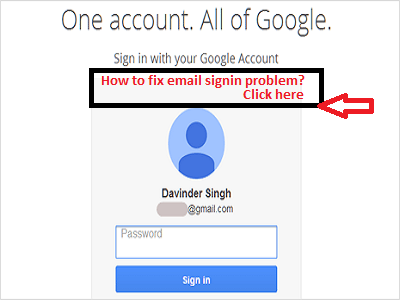
How to fix email sign in problem

Email sign in problem and how to fix it:      

     Emails  are  very  useful  part  of  Internet  which  is  used  to  communicate  with  friends  and  other  relatives.  It  is  also  used  officially  at  a  very  broader  range  due  to  its  importance. No  one  is  unaware  of  the  use  of  email  and  today  about  every  person  own  his/her  email  address.  But sometime  it  causes  a  problem  to  connect  to  server  and  it  becomes  difficult  to  access  the  email  address.  It  shows  error  stating  "couldn't  connect  to  server" . Now  question  arises  what  to  do  in  such  situation  when  our  access  to  email  is  necessary  and  it  does  not  respond  well.
 As  for  myself  I  had  faced  this  problem  several  times  and  as  my  habit  I  tried  to  solved  this  issue  and  thanks  God  that  I  was  succeeded  in  this  crucial  contest.

 As  for  myself  I  had  faced  this  problem  several  times  and  as  my  habit  I  tried  to  solved  this  issue  and  thanks  God  that  I  was  succeeded  in  this  crucial  contest.


Fig showing email sign in problem
Fix email sign in problem


Why  email  sign  in  problem  occurs:


Email  sign  in   problem  occurs  when  browser  doesn't  connect  properly  to  the  server  and hence it  shows  us  "could   not  connect   to  server"

How  to  fix  email  sign  in  problem:


 Fixing  the  email  sign  in  problem  is  not  a  hard  job.  Anybody  can  fix  the  issue  of  email  sign  in  by  following  my  simple  trick.                 
 According  to  me  email  sign  in  problem  can   be  fixed  by  two  methods.

1; by  changing  browser

2;  by  changing  ip  address

First  of  all  when  you  face  that  problem  then  change  your  browser  hope  it  will  work  for  you and  if   it  does  not  work  for  you  then  head  over  to  the  method  no 2  by  changing  ip  address. If  you  does  not  know  how  to  change  ip  address  then  click here.

Hope  it  works  for  you. If  you  likes  my  tip  then  leave  a  comment  and  share  with   friends  to help  them.
     

Posted By: Dr Rehman on Tuesday, 7 April 2015

Which has faster speed Ethernet cable or wifi adapter

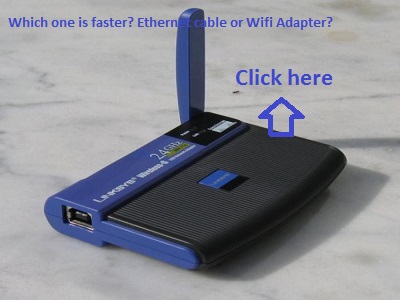
Today  I  am   going   with   a   post  "which  has  faster  speed   Ethernet  cable  or  wifi  adapter". While  using   Internet   on   laptop   we   have   two  options  to  use Internet.1: By   using   Ethernet   cable;2:By   using   wifi  adapter;But  the  question  arise  that  which  method  should  be  used  to  connect  to  the Internet  more safely  and  easily  without  hesitation  and  tension. Both  the  methods has  some  limitation  and some  advantages.  Now  I  am  showing  some  points which  will  clear  the  concept  and  makes  it easy  for  you  to  decide  which  method should  be  used.


Internet router powered by wifi and ethernet cable
Which has faster speed wifi or ethernet cable?

(1)-- Advantage  of  wifi  adapter:


  • It  is  with  out  any  wired  contact  which  is  its  most  useful  aspect
  • It  can  be  used  at  more  distance  from  the  router  which  adds  significance  to  its  positive  side
  • It  doesn't  need  an  extra  cable to  connect  to  the  Internet
  • This  system  is  wireless
  • The  free  wifi  wireless  system  at  public  places  is  most  used  positive  aspect  of  the  wifi adapter

Limitation  of  wifi  adapter:

  • It  is  more  power  consuming  of  the  laptop
  • It  drains  the  laptop  battery
  • It  has  comparatively  less  speed  as  compared  to  the  Ethernet  cable  but  the  speed difference  is  very  less  when  is  near  to  the  router
  • The  Internet  speed  is  less  when  are  far  away  from  the router 

(2)-- Advantage  of  Ethernet  cable:

  • The  Internet  speed  of  Ethernet  cable  is  more  than  wifi  adapter
  • It  is  not  power  consuming 
  • It  is  efficient  method  for  using  Internet  on  laptop
  • It  doesn't  drain  the  battery

Limitation  of  Ethernet  cable:

  • It  needs  a  wired  contact
  • The  wired  contact  causes  tension  and  hesitation
  • This  method  only  work  when  you  are  near  to  the  router

Conclusion:

Hope  I  have  covered  all  the  topic  clearly  and  efficiently.  If  you  still  facing some  problem  or having  some  argument  then  please  comment  below  and  also share  the  post  with  your  friends.
   

Posted By: Dr Rehman on

Tuesday, 10 March 2015

How to unblock websites using proxy

There are different regions where different websites are blocked by government due to different reasons. But these websites being advantageous for users are very important for them.Now the question arises what to do in such situations when you want to view such a site and it is banned in your region like youtube in Pakistan.

What is Proxy?;

Proxy is alternate server which change your ip address and thus showing mock location. If you connect yourself to the united states then all sites that are accessible in united states can be viewed by you even if such site is banned in your area.

What to do?;

Connecting yourselves to the proxy network is not too much tough job. It can be accessed through several methods but my most preferred method is using "Zenmate extention in your default browser" like chrome, IE and Opera.

How to add Zenmate Extension to the browser?;

Adding Zenmate Extension to your browser is not too much tough but I think it is very easy.Let's have a watch.
Download page of zenmate extension


  • Type the address"http://zenmate.com" in your default browser or click here.

  • If your default browser is Chrome browser then click on "1"
  • If your default browser is other than chrome then select your browser as shown in "2"
  • After that extension is downloaded and installed click on Zenmate extension in your browser
  • After clicking for the first time it will require registration but don't be afraid you will just give your email id and your account will be registered.
  • Once your account is registered click on the extension and click "off " in the drop down menu to activate the extension as shown below;

Zenmate extension when activated
If you still have some problem then please let me know in the comment section. Don't forget to share this interesting post with your friends to spread the knowledge

Posted By: Dr Rehman on Tuesday, 10 March 2015

Contact Us

Name

Email *

Message *


Recent Comment

Copyright © 2015- . Grat Spot . All Rights Reserved.
Designed by :- Muhammad Rehman