
Wednesday, 17 January 2024
Why does Apple require developers to apply to get permission to include links in their apps to inform about other ways to subscribe to a service?
Saturday, 19 March 2016
Get Free Youtube Subscribers+Likes+Comments+Views
Get Free Youtube Likes+Subscribers+Views+Comments:
While making a youtube account for the first time we face a huge hardship in gaining likes, subscribers,comments or even views on our uploaded videos. At that time the though that establish in our mind is to quit uploading videos to youtube. But it's not the right way because you are not alone in this world. People are waiting for your arrival to help you. You just have to avail that opportunities. With my these trips you will get free youtube subscribers likes comments and views and when next time you will upload video you will feel something new where people will like your videos much better before and I think that's the point you are waiting for so let's take some easy steps and be gone viral on youtube.
Today I am sharing some easy and reliable tips with you so that you can grow your channel and create a huge audience.

Here I will share some sites that you can use on daily basis and Get free Youtube subscribers+Likes+Views+Comment.
(1) YTMONSTER;
This is the most trusted,reliable and fast service present on internet. In this site you will have to earn points and then you will have to use these points to get free youtube subscribers likes comments and views. You can earn points on YTMONSTER by watching other people videos or by gaining referrals. The more referral you have the more you have chances to get more points. Once you earn points invest them to gain likes+subscribers+comments+views for your videos. The video that you want to show is the choice of yours. you can also select suitable time for your video that you want to show to others. Keep in mind that your 10 seconds video will cost you 1 point, 1 subscriber will 25 points, 1 comment will 50 points and one like will take your 25 points away.
Use this site more and more and then you will learn its terminologies. you can contact me anytime.

(2) Kingdom LIkes;

This is the perfect site for social media promotion not just youtube but all other popular social media sites like google+,twitter and instagram. This site carry a lot of option and that's the reason it has taken place in the list of top sites. In this site you can earn points by various ways as listed below;
- Liking Google+ posts
- Sharing Google+ posts
- Adding members to your google+ circles
- Twitter Followings
- Twitter likes
- Twitter retweeting
- Facebook posts likes
- Facebook Page likes
- Facebook Posts share
- Facebook Followers
- Youtube Videos view
- Youtube video like
- Youtube channel subscribers
- And lot more
Now you can invest your points to gain Youtube subscribers+followers+likes+views+comments and sharing.
The more points you earn the more you have chances to grow your youtube channels.
(3) Socialtrader.co;
Although seeing fake website form its stature this website does what you are searching for. This site can give you free youtube likes and video views. Here is no option for getting subscribers and comments. You can earn points by following way;
- Watching videos
- Liking videos
- Completing offers
- Referring members
- If your members get premium account you get extra points
Now it's time to invest those points to earn some real youtube views and likes. Go to manage video views or manage video likes and there add your desired video. Once you add your video you will notice the big change in increasing your youtube likes and views. Try to get more and more referrals to get likes+views without watching other videos.
Your one video watch will cost you 1 point while 1 like will cost 10-20 points.
(4) Gainsubs;
This site gives you the easiest method to get subscribers and likes for your videos. After signing up to this site you will have to add your desired video and then you will have to earn subscribers and likes. search for the videos that is marked with like4like or sub4sub and click on it. once you click it you get it. You have no need to do something else. You can earn something more subscribers and likes by referring other members to this site through your link. The more referral you get the more your channel will go viral.

You can also search for some other best sites like that but perhaps these are the best site to work with. I have used them all and found them very helping. It's on you how you see it but its a good way to start your early youtubing journey.
Note;
Use it on your own risk. I will not be responsible for any type of complication that arise.
Google Search Tags;
Get free youtube subscribers
Get free youtube Video likes
Get free youtube video views
Get free youtube followers
Get free youtube video subscribers and likes
Get youtube channel subscriber
Grow your youtube channel for free
Thursday, 18 February 2016
Top 10 Best And Easiest Ways To Make Money Online
Published Under :
Blogging
,
Internet
,
Make Money
,
Youtube

Making money from Internet is not a hard job. You have to work for some hours on your computer and perform any task that you know really well. It could be the work of any type from writing to singing and from singing to dancing and from dancing to blogging. So it doesn't need a hard work you just have to be special in any field and then you will be eligible to make money from internet. So get ready to see the post " Top 10 Best and Easiest ways to make money online".
1) Blogging:

Blogging is perhaps the best method to make a good money from your home. It don't needs too much experience. Just write on any of the topic of your choice and publish it to the internet. Your audience will see your posts and if they likes your posts they will come again and again for your blog and now they are not just your visitors but a valuable visitors now they are. because you can use them to make money online.There are several sites which offer you a chance to make a free blog but the most famous one is Google Blogger. If you want to know enough for google blogger then see this post .
Others blogging sites are given below;
After you have created your blog with any of the above services it's time to think about the ways of making money from that blog. First make your blog popular by posting interesting things and once you get famous you think for other ways of making money.
a) Google Adsense:
Once you set your blog and post enough contents on it you go for signing up to google adsense. Google adsense is an advertising service which after approving shows ads on your blog and when your visitor clicks on it you get money. It's the most simple,easiest and reliable way to make money online.
b) Other advertising services:
If you are unable to get google adsense approved then don't worry there are several other great sites waiting for you. Just join any of the following ad service and show their ads on your site to make money.
Here is a list of some of the great advertising services that you can join and make money form.
==> Infolinks:
If you are unable to get adsense approval then go for infolinks. It's the best alternative of adsense and show ads on the text of your blog. When visitor will click that specific text you will get money. There are different types of ads that you can use here with infolinks. Infolinks approves little faster as compared to adsense. It also make a good money.


==> Media.net:
If your blog is receiving enough traffic from all over the world especially united states, then you can join this advertising service co founded by Yahoo and Bing. It's a reliable advertising service and also pays a good money. Their ads are of good quality and gets much attention.
==> Clicksor:
It's another alternative to adsense which shows attractive banner ads on your blog. It has also a referral system where you can make money by referring your friends to this advertising system. I have also used it and it offers good money. It could be the best alternative to google adsense. If you are not getting google adsense approval then give it a single touch.
That was all about how to make money from blogging. Now we will move towards other ways of making money from internet.
2) Make Money From Youtube:

If you are interested in videos and can make a good video then you are near to make money from youtube.
One can make a good money from youtube if he knows about video editing and capturing. It's not a hard job its very easy and even a child can perform this task. So why we not go for this easiest method which can give us a good money.
If you are interested in making money from youtube then join Youtube.com and upload your favorite videos there. If your videos are likes by people then definitely you can get money. Just start uploading your own videos and then join youtube partner program. It will display ads on your videos and when someone will click these ads you will get money. Its a very simple method just try hard and you will be succeed soon. Upload your videos and then turn on monetization for it to generate money.
3) Freelancing:

There are websites where people are searching for people that can do work for them. If you cna do their work then you will get money. Just search the website for any work that you have the ability to do and then take it. If he offered that work to you then you will get money after completing tasks. On these sites there are more than thousands of jobs waiting for you where you can generate money. Some great freelancing websites are following:
- Freelancer.com
- Guru.com
- odesk.com
- elance.com
4) Surveys:

- Surveyscout.com
- Surveyhead.com
- surveysavvy.com
5) Question Answer:
There are sites around internet where people ask their question and when someone answer them correctly the site gives money to the user. So select any of your special field and see the questions of the people and then if you the answer post the answer there. I f you give correct answer you will definitely make money.
Some of the best such sites are listed below:
- http://www.knowbrainers.com/
- http://www.justanswer.com/
6) URL Shortner Service:

If you want to make money for just posting the link then you can try this method. This is a really simple method. Just short your long url with these site and then post there short links anywhere you want. When someone will click on such link they will see advertisement for five seconds and you will get money for that. If you own your own blog/site then you can make a huge amount of money just by shorting the links placed on your blog/site. If you are your blog owner then you can short all the links on your blog with a script they provide you on their site. They also show popupads if you like because this type of ad gives more money. You can also make money by referring other friends.
Some of the best URL shortner services are shortlisted here:

Fiverr is a website where you can sell your work for 5$. Just write any type of post and sell it for 5$. If someone will like your post they will but it from you. Search google for it to know the tricks of making money from Fiverr. You can access the site through this link https://www.fiverr.com/.
8) Affiliate Marketing:
If you can sell products on your website or social media sites then this trick is for you. Just join any of the affiliate sites and sell their products. You will get commission for every sale you make. So if you have the ability of affiliate marketing then this trick can make 1000$ for you in no time. Some of the best referral sites are listed below:
- Clickbanks
- Maxbounty
- Amazon
- Ebay
- Linkshare
9) View Advertisements and complete offers:
If you want to make money for just viewing ads then you can do it. It's simple and reliable. You get money for every ads you view. Further you can make money for completing offers such as downloading apps, Watching videos,signing form or taking surveys. These sites also offer you a chance to get money from the referral you get. Some of the best sites are listed here:
- Clixsense.com
- Neobux.com
- ojoo.com
10) Join Payoneer Referral Service:
Payoneer is online banking service where you can pay or receive money form different sources. It offers us a chance to make money online. Join it referral service to earn 25$ per referral. When someone will join through your link and gets 100$ rupees in his payoneer account both of you will get 25$. So it's a great way to make money from. Just join through my referral link and we will both get 25$ in free. So it's the most easiest way. Share it with your friends. You can use social media service to gain referral.
Join my referral link here. Payonner affiliate
That was all about how to make money from internet. If you have knowledge of any other methods then share with me in the comment section.
Share our Work:

Google Search Tags:
Best ways to make money online
How to make money form internet
Top 10 ways to make money online
Make money from Internet
Making money online tricks
Top 10 reliable ways to make money
Easiest ways to make money
Tuesday, 16 February 2016
Download Youtube Videos Without Software in any format

Download Youtube videos without software in any format:
Youtube is a video sharing website which is used by millions of people everyday. While searching on youtube we come across such videos that are very interested and the first thinking that come in mind is that to download this video. There are too many softwares to download video from youtube but how would be the experience if we download video without using any software? Today I will guide you " How to download youtube videos without any software in any format".
To download videos from youtube we will use a third party website to do our work . Its safe and easy and you will love this. Follow the following steps to download video from youtube in few minutes.
- First of all go to youtube and search for the video that you wish to download.
- Examine the link of the video and now we will have to make some changes in the link. Don't be afraid its easy and simple. Add SS before the youtube in the video link. For example if video link is as "https://www.youtube.com/watch?v=PtUCt12qeC4" then after making changes the link would be like that "https://www.ssyoutube.com/watch?v=PtUCt12qeC4" .You can also see the photo for illustration.

- Now press enter and you will be taken to a new webpage from where you can download the video just by clicking download. Is it simple? see the photo how it would look like.

- As the screen appear just download the video in any format you wish to have. You can also save it as mp3 file if you desire.


Download Youtube videos from Downvids.net:
If you want to download videos directly from another website then this trick is for you. Just go to the link address "http://downvids.net" or click the link given upward. After going to this site paste the URL of the youtube video that you want to download and click the download button. You will be given a direct link to your video. You can also save it in mp3 format. You can also download the whole youtube playlist from this site. Its a great,easy and fast loading site to work with. You can see the main page of this site in this screenshot.


Download video from Keepvid.com:
You can also download youtube video from "keepvid.com" . Just visit this site and paste the url of the video you wish to download. After pasting the url click the download button. As you click the download button wait for a while and then your download will be ready. This site is more better because you can save video in almost any format. So it's a great surplus of this site over "downvids.net". But both are useful on their own places just use any of these two and it will definitely work for you. Watch the main page of this site here.


That was all related to " how to download youtube videos without any software in any format". If you are not satisfied and feeling any type of confusion then let us know in the comment box. we will right back soon.
Watch our Video at Youtube for " How to download youtube videos without any software" ;
Share our work:
Google search tags:
Download youtube videos without software.
Download youtube videos in any format.
Download youtube videos without any software in any format.
Download youtube videos from downvids.net.
Download youtube videos from Keepvid.com.
Download youtube video with ss method.
Sunday, 31 January 2016
Tom Clancy's Ghost Recon:Future Soldier Free Download PC Game


Tom Clancy's Ghost Recon: Future Soldier:
- Developer: Ubisoft Paris
- Publisher: Ubisoft
- Genre: Shooter
- Release Date: June 12, 2012
About Tom Clancy's Ghost Recon: Future Soldier
Providing yet another new direction in the Ghost Recon series of military games, Ghost Recon: Future Soldier promises to go beyond the core Ghost Recon franchise and deliver a fresh gameplay experience. The game features cutting-edge technology, prototype high-tech weaponry, and state-of-the-art single-player and multiplayer modes.
Minimum System Requirements:
- OS: Windows XP/Vista/7
- Processor: Intel Core 2 Duo @ 2.2 Ghz / AMD Athlon 64 X2 4400+
- Memory: 1 Gb
- Hard Drive: 25 Gb free
- Video Memory: 256 Mb
- Video Card: nVidia GeForce 8600 / ATI Radeon HD 3850
- Sound Card: DirectX Compatible
- DirectX: 9.0c
- Keyboard
- Mouse
- DVD Rom Drive
Recommended System Requirements:

- OS: Windows XP/Vista/7
- Processor: Intel Core 2 Quad @ 2.66 GHz / AMD Phenom II X4 @ 3.0 GHz
- Memory: 3 Gb
- Hard Drive: 25 Gb free
- Video Memory: 1 Gb
- Video Card: nVidia GeForce GTX 460 / ATI Radeon HD 5850
- Sound Card: DirectX Compatible
- Network: Broadband Internet Connection for Online Multiplayer
- DirectX: 11
- Keyboard
- Mouse
- DVD Rom Drive


Download Tom Clancy's Ghost Recon: Future Soldier Direct Links

Share our work with your friends and family
Thursday, 14 January 2016
A best Screen Recorder & Video Editor | BB FlashBack Pro 5.6.0 Build 3551
Click Here to download Screen Recorder.
Monday, 21 December 2015
How to block Facebook and other sites
Published Under :
Facebook
Today I am going to share a post that is "how to block facebook and other sites ". I hope that you guys will like the post much and will share it will your friends and family to spread the knowledge. The post is made very easy and any body can understand it if read thoroughly. So now we proceed to block facebook and other sites.
Sometimes it is necessary to get away from facebook when you have to perform some very urgent work such as office task or your self study. You may want to block facebook on your computer so that your children or anybody else don't open facebook.
Facebook can be easily blocked on your computer as well as android smartphone. You can install apps to block facebook on your computer but if you want to operate it without software then you can do it in some easy steps.
This method is prominent to block any website including Facebook.
Noe if you want to block facebook with third party software and cannot follow the process as discussed earlier then you are not alone. There are bunch of softwares that you can use and block website like facebook. The description of some very popular softwares are given below;
Blockitforme:
It is a small tool which can block several sites such as facebook, linkedin, blogger, twitter and other important websites. It is completely free software. Just run this software and select the website that you want to block and you are done.You can download it from the link given here http://blockitfor.me/download.php?file=blockitfor.me.zip
Theweblocker:
It is also a good tool to block facebook. It is also free and light. Its prominent feature is that you can select password on it so that those softwares that you have blocked can not be unblocked by any other person.
You can download it from here
http://thewebblocker.com

Trend micro security app for android:
If you want to do it with software then there are no specialized apps for it. Here is a single software that is actually antivirus can help you in this regard. Just download "Trend micro security app" from playstore and run it after installing. Make your own account and now you can block any website with this tool including facebook.
 Hope that you have liked the post very much. Share it with your friends and family to boost my interest more in this field to serve people more better. If feeling any sort of confusion then let me know in the comment section.


Sometimes it is necessary to get away from facebook when you have to perform some very urgent work such as office task or your self study. You may want to block facebook on your computer so that your children or anybody else don't open facebook.
Facebook can be easily blocked on your computer as well as android smartphone. You can install apps to block facebook on your computer but if you want to operate it without software then you can do it in some easy steps.
Block Facebook without Software on PC:
This method is prominent to block any website including Facebook.
- First go to this address on your pc:--- c:\windows\system32\drivers\etc
- Now find the host file in the location given upward and open it with the notepad.
- Now at the end of the notepad file add this line "127.0.0.1 facebook.com www.facebook.com"
- If you want to block another sites then write the name of the website in place of example.com as "127.0.0.1 example.com www.example.com"

Block facebook by software on PC:
Noe if you want to block facebook with third party software and cannot follow the process as discussed earlier then you are not alone. There are bunch of softwares that you can use and block website like facebook. The description of some very popular softwares are given below;
Blockitforme:
It is a small tool which can block several sites such as facebook, linkedin, blogger, twitter and other important websites. It is completely free software. Just run this software and select the website that you want to block and you are done.You can download it from the link given here http://blockitfor.me/download.php?file=blockitfor.me.zip
Theweblocker:
It is also a good tool to block facebook. It is also free and light. Its prominent feature is that you can select password on it so that those softwares that you have blocked can not be unblocked by any other person.
You can download it from here
http://thewebblocker.com

How to block facebook on Android smartphone:
If you are using android smartphone and want to block facebook on it then you can do it in some easy steps.- First download "ES File explorer" from the playstore and open it after installing.
- Now click on the "/" in the upper side. After that select "system" and then search for folder named "etc".
- Now search for the host file in the etc folder and open it with "Es note editor".
- After a while click on the three dots on the right upper side and then select "edit".
- Now you can edit this file and add this line as you saw in upper section "127.0.0.1 facebook.com www.facebook.com"
Trend micro security app for android:
If you want to do it with software then there are no specialized apps for it. Here is a single software that is actually antivirus can help you in this regard. Just download "Trend micro security app" from playstore and run it after installing. Make your own account and now you can block any website with this tool including facebook.


Wednesday, 23 September 2015
How to block right click on blogger
Published Under :
Blogging
,
Web development
 |
| Block right click of blogger site |
Click here to learn what is blogging and what is its advantage?
Now I am proceeding to my topic which is for those who have little bit knowledge of blogging. The post that I am going to share is " How to block right click on blogger".
Yes you have heard it right. If someone goes on your blogger site and want to right click there he will not be able to right click there but he will get a notification saying that this function is disabled on this site. Now you will think that what is the benefit of this process then I am showing you that There are people who while searching the Internet and finds something interested then they copy the whole text on your blog and then paste it to their own blog. Which means they steal your hard word and gets credited. Which is very hesitated for the bloggers who work hard to build their own articles and then suddenly someone copies his contents. If you block right click on your blogger then all photos on your blog that you have created can not be stolen by any other person and it will become your own forever.
So now I hope that you are convinced to "block right click on your blogger". So that all your hard work remains yours and not committed to someone else.

How to block right click on blogger:
Blocking right click on blogger is not a hard job. It is very easy if you follow me thoroughly. It just need a script which I have assembled for you. You have no need to worry about just follow me as a leader.
Now we are going to the end of the process to protect our privacy and contents which is our basic right.
- First of all you have to Download the script code from here.
- Now go to your blogger dashboard and select "Layout" in the left standing menu as given in the pic below

- After clicking layout wait for the new window to open. There you select "add a gadget" and when new screen appears then select " HTML/Java Script"
- Now we are going to the end of the process. After selecting Html/ java script paste the code there which we have downloaded in the first step.
- After pasting save the widget and now you are done.
- Now go to your blogger and try right clicking there you wills see that this function is disabled.
- After doing this process no one will be able to right click on your blog even you will be unable to right click there.
- If you are not happy with " blocking right click on your blog" then you can undo the process by simply deleting the widget that you have recently made.

Watch video at Youtube:
Watch video at Dailymotion:
Hope that you have liked my post but if you are still facing any type of problems then please let me know in the comment section below. Share with your friends because "sharing is caring"
Sunday, 30 August 2015
Best alternative of Iphone 6 1plus2 review
Published Under :
Android
,
Smartphones

It is the era of smartphones and everybody willing to buy a great smartphone as it has become a fashion to have high quality mobile. Samsung and Iphone are the two companies whose smartphones are very familiar in the world. Almost everybody desire to have such a special smartphone as those of samsung and iphone. But these smartphone being very cost effective are out of budget to the users who live an average life with limited resources. But if you want to buy a best smartphone and cannot bear the money of costed smartphone the their is a brand for you whose smartphones are little costy and also good as compared to the iphone and samsung. The brand is 1plus which offer you the best smartphone at very low cost as compared to the rivals.
1plus2 Review:
1plus2 can be the best alternative of iphone and samsung due to its brilliant features. 1plus2 has high resolution screen,powerful camera and finger print censor. Its price is almost half of the iphone price which marks its beauty.The smartphone 1plus2 has been built by a chinese company "startup". The size of the screen is 5.5". 1plus1 smartphone was the first smartphone released by startup company. This is the best alternative of iphone and samsung smartphones.
The smartphone is sold in England for 239 pounds and in America for 329$. This android smartphone is operated by google android version 5.1(Lollipop). The screen size is 5.5 inches and resolution is 1080p. Its display can be clearly seen under sunlight which is its superb quality. 1plus2 android smartphone has the latest chipset of Qualcom Snap Dragon 810. This smartphone is available in two models. One smartphone model has 16Gb storage and 3Gb ram while the other model has 64Gb storage along with 4Gb ram.
Another superb feature of this smartphone is its powerful camera which is 13 mega pixel. The front camera is 5 mega pixel to capture memorable selfies. On the other hand the back camera of iphone is 8 mega pixel. It has finger print sensor to scan finger print and can be used to unlock smartphone and there is no need of remembering the password. Its advantage is one that no body will be able to hack your password and it increases the security of your privacy.
1plus2 has optimised the interface of lollipop and it looks pretty cool. The operating system has been named as "Oxygen OS". Users can use gestures to control the smartphone. The weight of this smartphone is as low as 175 gram. The smartphone has USB-C port which is the latest version of the USB and it is hoped that this sample will be followed by several companies in the future.

Conclusion:
These were the features that makes 1plus2 the best alternative of iphone and samsung.
I will be waiting for your reviews and if you liked the post then please share it with your friends to inform them about this great mobile brand.
Thursday, 6 August 2015
Get Free Facebook Followers and likes In One Click
Published Under :
Facebook

Now I am going to teach how to get free facebook followers and likes and I hope that you would like my post and effort.
First of all we will take start from a free website 4liker which offers its services for free. There you can get free facebook followers and likes on your status update. You can also get likes on your fanpage. There are great tools on the website which you can use for free but one bad thing is that the website is loaded with bunch of ads. But its not too much huge problem because these ads can be stopped by using ad blocker.
Now I am going to show you the detail of the process of getting free facebook followers and likes.
Go to the 4liker website and click on (1) " click here to get access token" in the website window by scrolling down as shown below.


Now you can close the window after giving permission to the website and now we will go to next step. The next step is to get the access code and for that click on " get access token from here" on the previous page where we have given the website a permission to the process as you see in the pic below.

Now as you click on the link above you will be taken to next page and then copy the url of that page by simply clicking right in the address bar and then selecting copy. Now we are going to the last step. Go to the first page as shown in first image and paste the url you you recently copied there in the first page. Now you are all done and you will be prompted to the next step and there you will have a choice to select auto followers or auto likes or fan page likes or something else. During this process you will face hardship with ads but ads are their sole source of generating income. But if you like you can block the ads by using ad blocker.

Note: I have used the site several times and it worked fine but if it causes problem for you then I will not be responsible for it. Use it with your own caution. ( free tip by gratspot)
Use USB as a ram memory
Published Under :
Pc
Have you ever thought to use your usb as a ram to increase your computer memory? If not then start thinking now because today I am going to share a very important post " How to use usb as a ram". Yes you have heard it right now you can use usb as a ram for free. No third party software or utility is needed for the process. It is the built in feature of the windows which you can use very easily in few steps and in few minutes.

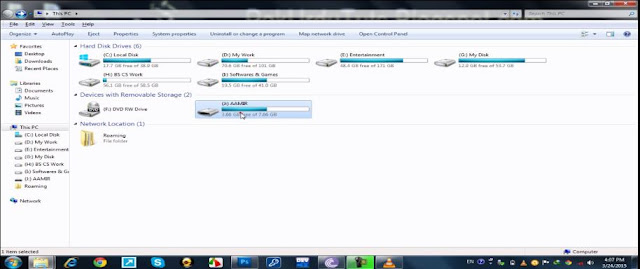

Now we will proceed to the process of " How to use usb as ram".
First of all insert your usb into computer and format the usb in order to free the space for the process. You can see in the picture that the usb is formatted and no data is there.
 |
| Usb inserted and formatted to free up space |
After making sure that your usb is formatted and their is at least 2 GB free space on the usb, right click on the usb drive and select properties as given in picture below.
 |
Right click on the usb drive and select propertiesAs you click on the properties a new screen will appear and now we will have to proceed to the next process. So select the tab of "ready boost" in the new screen appearing after clicking on the properties. |
After clicking ready boost a new screen is appeared where you have option to choose how much usb storage you want to use as a ram. The next step is to check the box of " use this device".

Now click on "ok" and you have done the process in few minutes by following few easy steps. Now you can observe the device that the storage you allocated for the ram has been taken and cannot be used to storage because it is now using as a ram.

Now you will observe that your pc is performing much better than before because usb drive has ease the burden on the default ram installed on your pc. Now whenever you will connect the usb drive it will be used as a ram. If you want to recover the space allocated for the ram then you can do it by following the above process and selecting " do not use this device" instead of selecting "use this device" as in previous step.
Hope that you have liked the post but if you still feeling confusion then let me know in the comment section. Don't forget to share it with your friends to spread the knowledge. Tell your friends to use usb as a ram.
Subscribe to:
Posts
(
Atom
)


